





I spent some time trying to connect a Yeelight Wireless Smart Dimmer to Home Assistant.
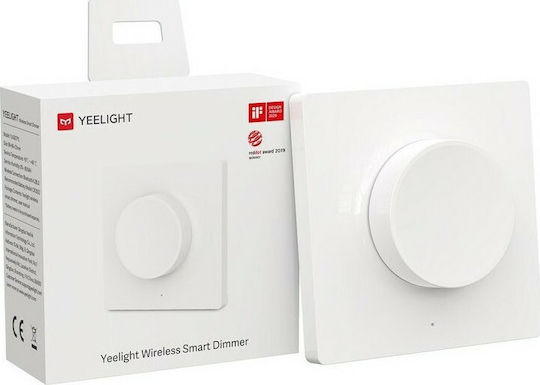
Disclaimer: This dimmer is compatible with Yeelight smart ceiling light series, Yeelight Crystal Pendant Lamp and Yeelight Smart Curtain Motor. Control the devices freely anytime and anywhere.
project page: Yeelight
YLKG07YL
The device I used is:
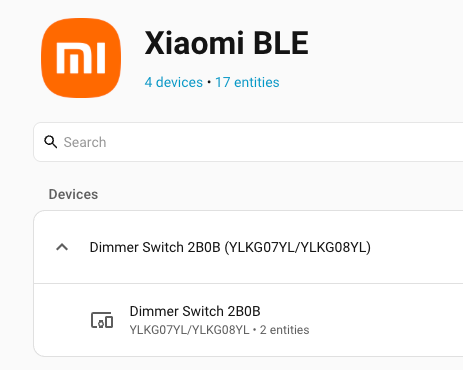
Dimmer Switch 2B0B
Model: YLKG07YL / YLKG08YL
Bluetooth name: yee-rc
Firmware: Xiaomi MiBeacon V3 encrypted
The goal was simple: use the Yeelight dimmer knob inside Home Assistant as I made a mistake buying it. I do not have a ceiling light but a few yeelight lamps. Thus I wanted to setup this dimmer to HA, so could use it to any device, to rotate it, to change brightness and press it to toggle a lamp or play a text to speech to my soundbar!
The final result works nicely with the Home Assistant Xiaomi BLE integration.
The project
The code I used is available here:
https://github.com/ebal/yeelight-dimmer-pythonThis repository is a fork, and contains a Python handler for the Yeelight YLKG07YL / YLKG08YL Bluetooth dimmer. It can receive, decrypt, and handle Bluetooth notifications from the dimmer. The repository README also shows how to run the demo script and retrieve the beacon_key, which is needed because the dimmer broadcasts encrypted sensor data. I forked the original project as my firmware version is newer than previous models and original project didnt work.d
Finding the dimmer
First, I scanned for Bluetooth LE devices.
sudo hcitool lescanor better, use bluetoothctl directly:
bluetoothctl scan onThe dimmer appeared as:
F8:24:41:C9:2B:0B yee-rcSo the MAC address of my dimmer was:
F8:24:41:C9:2B:0BGetting the beacon key
The Yeelight dimmer sends encrypted data, so Home Assistant needs a 24-character hexadecimal bindkey / beacon key.
The repository provides a demo script for this:
sudo python3 demo.py F8:24:41:C9:2B:0BWhen the script asks you to press the Pair button, press the small pairing button on the dimmer.
A successful run should print something like:
using mac F8:24:41:C9:2B:0B
! Press the "Pair" button at the dimmer...
Connecting... done
Authenticating.. done
beacon_key: xxxxxxxxxxxxxxxxxxxxxxxx
The beacon_key is the value that must be added to Home Assistant.
Adding it to Home Assistant
After getting the key, I added the dimmer through the Xiaomi BLE integration in Home Assistant.
Home Assistant detected it as a dimmer device. After that, I could use the 5 dimmer events in automations, such as:
Long Press
Press
Rotate Left
Rotate Left (Pressed)
Rotate Right
Rotate Right (Pressed)
Automations
to make it more interesting, here are some (random) automations:
Rotate right to increase brightness
When I rotate the dimmer to the right, I increase the brightness by 25.
alias: Dimmer_Rotate_Right
description: ""
triggers:
  - trigger: event.received
    target:
      device_id: defd42d5517df84480bc151db714a0d3
    options:
      event_type:
        - rotate_right
conditions: []
actions:
  - action: number.set_value
    target:
      entity_id: number.yeelink_de_470134772_colorb_brightness_with_zero_p_3_5
    data:
      value: >-
        {{
        [states('number.yeelink_de_470134772_colorb_brightness_with_zero_p_3_5')
        | float(0) + 25, 100] | min }}
mode: single
This reads the current brightness value, adds 25, and makes sure it does not go above 100.
Rotate left to decrease brightness
When I rotate the dimmer to the left, I decrease the brightness by 25.
alias: Dimmer_Rotate_Left
description: ""
triggers:
  - trigger: event.received
    target:
      device_id: defd42d5517df84480bc151db714a0d3
    options:
      event_type:
        - rotate_left
conditions: []
actions:
  - action: number.set_value
    target:
      entity_id: number.yeelink_de_470134772_colorb_brightness_with_zero_p_3_5
    data:
      value: >-
        {{
        [states('number.yeelink_de_470134772_colorb_brightness_with_zero_p_3_5')
        | float(0) - 25, 100] | min }}
mode: single
This works, but there should be some small improvements, to keep the brightness between 0 and 100.
I will update the blog post if needed in the future to fix this.
Press to toggle the lamp
Pressing the dimmer toggles the bedside lamp.
alias: Dimmer_Press
description: ""
triggers:
  - device_id: defd42d5517df84480bc151db714a0d3
    domain: xiaomi_ble
    type: dimmer
    subtype: press
    trigger: device
conditions: []
actions:
  - action: light.toggle
    metadata: {}
    target:
      entity_id: light.mibedsidelamp2_77c5_mijia_bedside_lamp_sw_auth
    data: {}
mode: single
This is the most useful automation for daily use: press the knob and the lamp turns on or off.
That’s it !
Evaggelos